Historic Statistics
VRTI automatically tracks your usage over time, allowing you to view your historic statistics and progress. Historic data is only ever stored locally on your computer.
Tracking Points
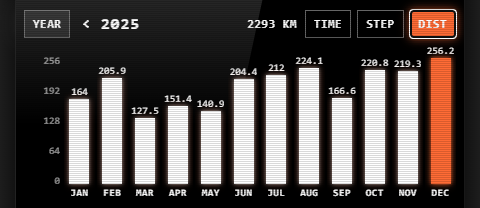
VRTI records every session you have with your treadmill, tracking the following metrics:
- Active Time: The total time you spent walking or running.
- Distance: The total distance you covered.
- Steps: The number of steps you took (if supported by your treadmill).
Viewing Statistics
You can view your statistics in different ways to analyze your progress:
- Weekly View: Shows a daily breakdown of your stats for a selected week.
- Yearly View: Shows a monthly breakdown of your stats for a selected year.
Resetting Statistics
You can reset your historic statistics at any time by pressing the “Reset” button while viewing your history.